03 — Breadfast
Bin Positions — Designing the Dark Store's Memory
Role
Product Designer
Platform
Desktop · Mobile
The Problem
Pickers were navigating a 40,000+ SKU dark store entirely from memory — losing minutes per order, every single shift.
Breadfast dark stores stock over 40,000 unique products. Pickers received orders on a handheld device but had no location data — just a product name. Every shift started with memorising shelf positions. When stock moved (which happened constantly), pickers relied on WhatsApp groups and colleagues to find items, adding minutes of searching per SKU.
The unofficial system was surprisingly sophisticated — printed barcode sheets taped to shelves, WhatsApp groups for moved items, picker-to-picker location sharing. These workarounds told us the team already understood the value of location data. What they needed wasn't a new concept — it was a digital layer that could keep up with constant stock movement.
Research & Process
Contextual Observation
Spent time in the dark store watching pickers work. Documented the "unofficial system": printed barcode sheets on walls, WhatsApp group chats for moved items, and colleague-to-colleague location sharing — all workarounds for a missing digital layer.
Mapped the full operational ecosystem in one sketch — how bins connect the supplier pipeline, the stock specialist's putaway process, and the picker's order flow. This became the reference diagram for every design decision that followed.
Picker Journey Mapping
Mapped every moment of a picker's shift — from arriving at the fulfilment point to waiting between orders. Identified 4 critical pain points around product discovery, location recall, and the time lost navigating without bin guidance. The emotional arc was just as revealing: confidence drops sharply the moment a picker can't find a product and has to rely on memory or peers.
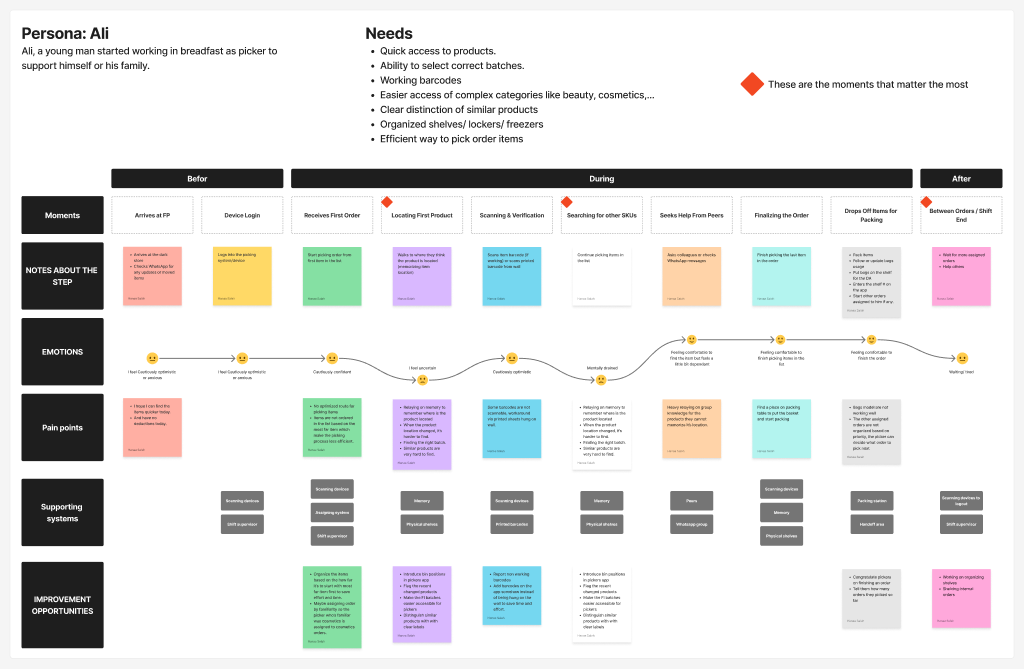
Persona: Ali — a young picker whose shift depends on memorised shelf positions. Red diamonds mark the moments that matter most.
Operational Flow Analysis
Mapped all existing ops flows: creating bin locations, assigning SKUs to bins, receiving internal orders, and the putaway process. Identified exactly where the digital tool fell short at each handoff — particularly the gap between receiving stock and updating location data, where errors compounded downstream.
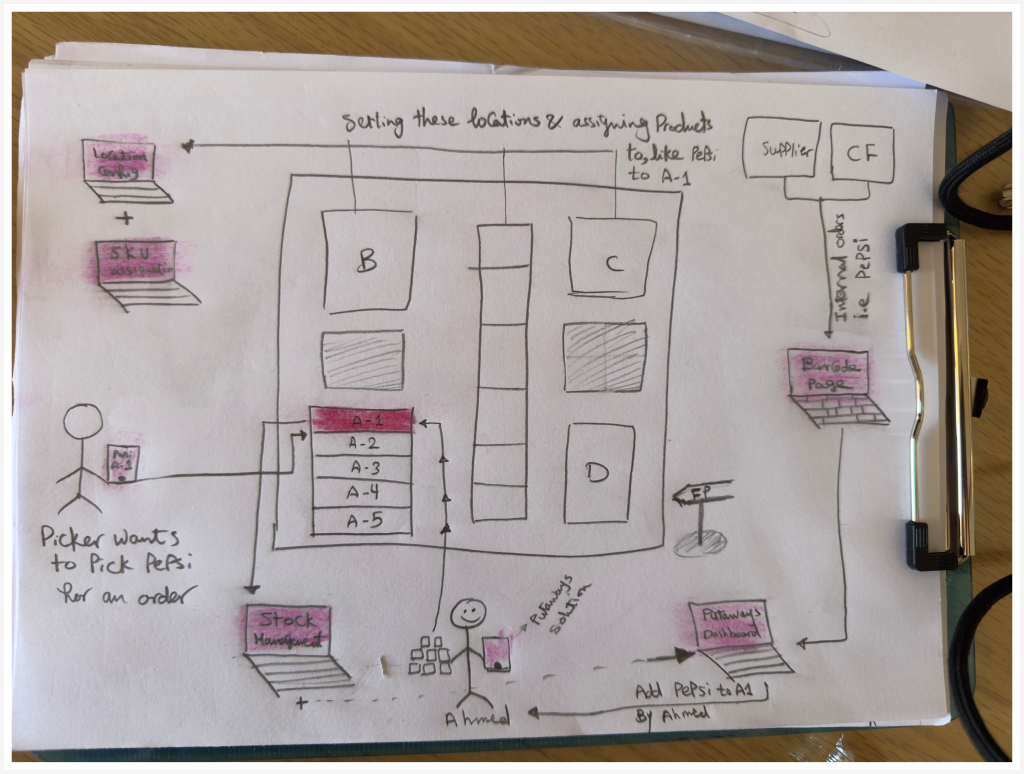
Early system mapping — the physical store layout with shelves A–D, bin numbering (A-1 through A-5), and how each role touches the location system: supplier delivers to the barcode page, stock specialist Ahmed runs putaway, picker navigates by bin code. Drawn on-site during observation.
Usability Testing
Ran usability testing sessions across both the putaway process and picker flow. Tested with real pickers and ops staff in-store — covering scenarios like adding stock to a single bin, splitting quantities across multiple bins, and handling edge cases mid-flow. The split-quantity scenario was the most revealing: the first prototype assumed one bin per product, which broke immediately with high-volume items.
Solution
Desktop tool for stock specialists and store managers. Creates the data layer that powers the picker app.
Bin Configuration System
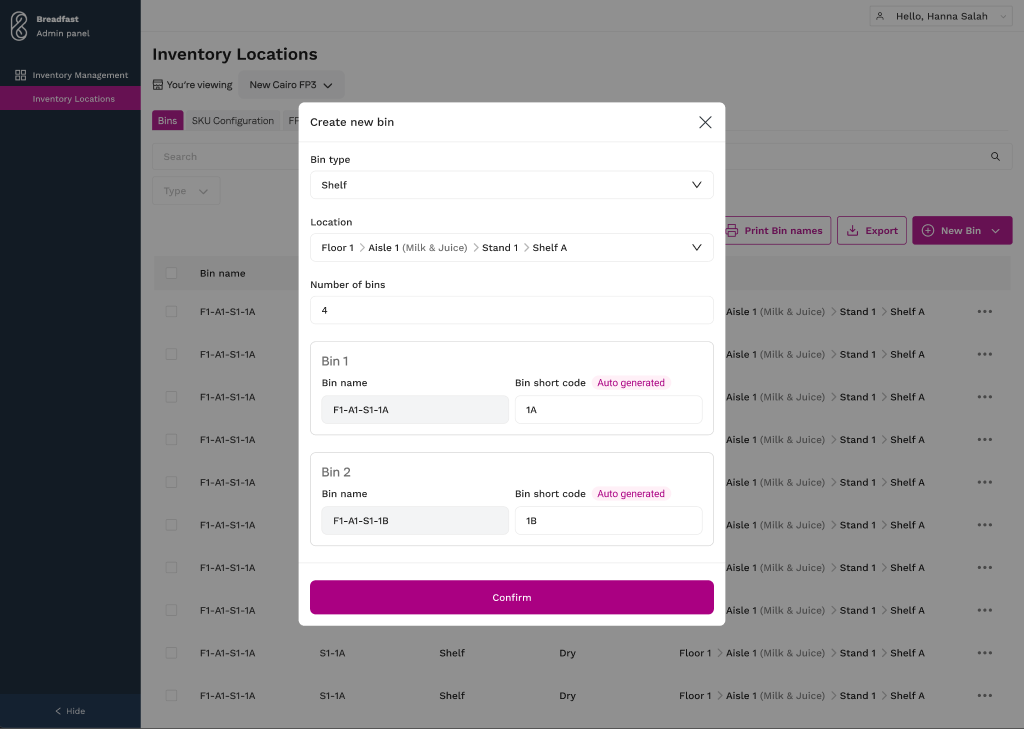
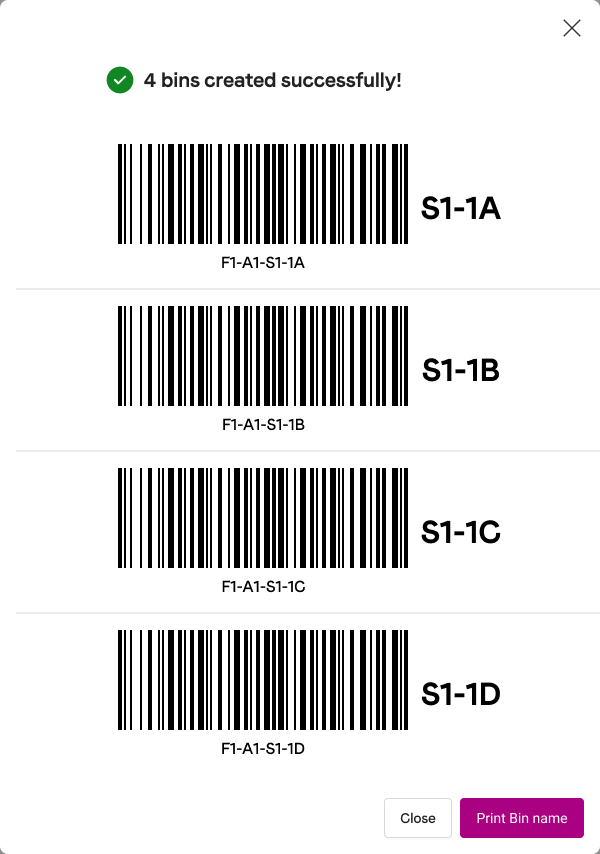
Define bin type, location hierarchy (floor → aisle → stand → shelf), and number of bins in one step. Short codes are auto-generated for each bin, and scannable barcode labels are ready to print and stick on shelves — giving every bin a physical identity the picker app can recognise.
Define bin type, location hierarchy (floor → aisle → stand → shelf), and number of bins in one step. Short codes are auto-generated for each bin.
Scannable barcode labels are ready to print and stick on shelves — giving every bin a physical identity the picker app can recognise.
Key design decision
The hierarchy mirrors how pickers already think about space. We tested zone-based and product-category-based structures, but pickers consistently navigated by physical landmarks. The short codes (S1-2A) were designed to be speakable — pickers call out locations to each other across the store, so codes needed to work as spoken language, not just screen labels.
Smart Putaway Flow
When stock arrives, the specialist sees a recommendation for which quantity to add to which bin. The system validates the bin type (chilled vs. ambient) and handles split quantities across multiple bins.
Why this pattern
Putaway was the hardest flow to get right. We tested three versions. V1 was a blank form — specialists didn't know where to start. V2 showed the recommended bin but not how to split quantities. V3 recommended both bin and quantity, with a simple confirm-or-adjust action. The key insight: specialists wanted a recommendation to react to, not a blank form to fill.
Mobile app used one-handed in the warehouse. Consumes the bin data to guide pickers directly to the right shelf.
Bin Positions in the Field
The bin system only works if pickers can access it without stopping. Each item in the order list shows its bin code directly on screen — pickers navigate straight to the right shelf without guessing. When adding a product manually, pickers enter the shelf code first — reinforcing the bin system and keeping location data accurate.
Design constraint
Pickers hold a device in one hand while pulling products with the other. Every screen, every tap, every field has to justify its attention cost. The bin code badge was deliberately kept to a single line — large enough to read at arm's length, small enough to not push the product image and quantity out of view.
Reflection
This project taught me the most about designing for environments where the screen is secondary. The strongest design decisions were the ones that removed a step rather than adding a feature. A recommendation the specialist can confirm in one tap. A bin code the picker reads without stopping. Every interaction earned its place by saving time — not by being clever.
Impact